

Clean internet from Hong Kong. One tap.
Your traffic leaves through Singapore, Tokyo, Seoul, the US or Europe, so you browse and stream as if you were there, on a connection that looks like ordinary HTTPS. It keeps working on networks that block VPNs.
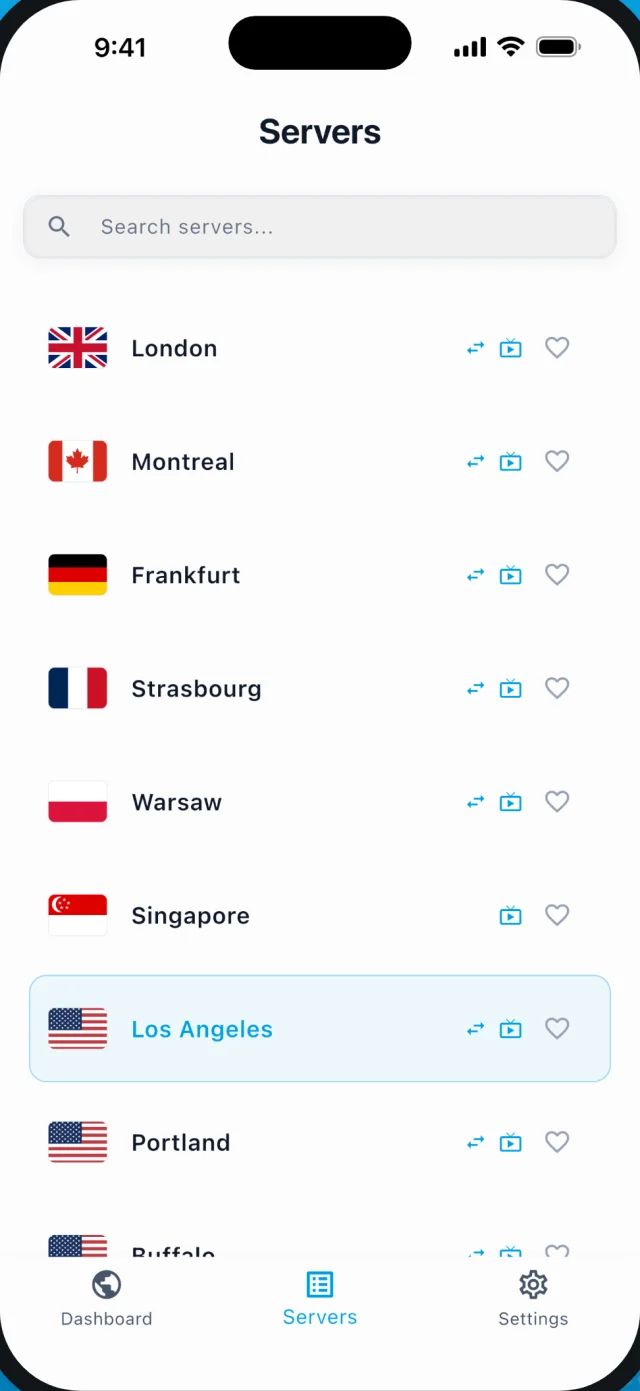
Pick where you come out
Hong Kong
you are here
Singapore
closest exit
Tokyo
Japan, next door
Seoul
Korea, next door
Los Angeles
US streaming & apps
London
UK & EU streaming
Every location on every plan. Keep the Hong Kong exit for when you only want privacy on the Wi-Fi you are on.
Looks like HTTPS
To any network it is a visit to a website. Blocking it means blocking the web.
The app picks the route
Pathfinder tests the routes and connects with the one that works. You tap once.
Works across the border
Set up here, keep working in Shenzhen. Built to survive inspection.
Your ISP sees nothing
Not the sites, not the DNS, not that it is a VPN. We keep no logs either.
Streaming, too
Pick a US, UK or EU exit and your streaming apps show that region's catalog. Unlimited data, servers tagged for streaming, full speed.
Step-by-step setup for Hong Kong · Curious what makes it invisible? How stealth works
Crossing to Shenzhen? Set it up before you go.
- 1
Install and sign in
iPhone, Android, Windows or Mac. Nothing to configure.
- 2
Connect once, here
Confirm it works on this side of the border, on your own Wi-Fi.
- 3
Cross. It keeps working.
Pick Singapore or Hong Kong as the exit for the shortest path back out.
The full pre-crossing checklist · Prefer a manual client? Guides for Hiddify, V2Box and VLESS Reality.
One plan. Every protocol, every exit.
The price you sign up at is the price you keep.
1 Month Plan
Billed monthly· Most flexible
- 3 Simultaneous Devices
- Unlocks streaming
- Anti-DPI stealth + Pathfinder
- All protocols, WireGuard included
- Unlimited Bandwidth
- Priority Support
- Instant Setup
12 Months Plan
€59.99 billed once a year(Save 62%)
- 5 Simultaneous Devices
- Unlocks streaming
- Anti-DPI stealth + Pathfinder
- All protocols, WireGuard included
- Unlimited Bandwidth
- Priority Support
- Instant Setup
6 Months Plan
€44.99 billed every 6 months(Save 42%)
- 4 Simultaneous Devices
- Unlocks streaming
- Anti-DPI stealth + Pathfinder
- All protocols, WireGuard included
- Unlimited Bandwidth
- Priority Support
- Instant Setup
Questions from Hong Kong
Is it legal to use a VPN in Hong Kong?
Yes. There is no law in Hong Kong against using a VPN, and many people and businesses use one every day for privacy, remote work and travel. What a VPN cannot do is make something legal that is otherwise not; it only keeps your connection private.
Will it keep working if networks in Hong Kong start blocking VPNs?
That is what the stealth protocols are for. VPNBaron's VLESS · Reality and Hysteria2 connections are real TLS on port 443 — to a network they look like an ordinary visit to a website, so blocking them would mean blocking the encrypted web itself. Standard protocols like OpenVPN and IKEv2 are included too, and the app's Pathfinder picks whichever route works on the network you are on.
Which exit should I pick from Hong Kong?
The closest locations outside Hong Kong, elsewhere in East and Southeast Asia, are the everyday choices. Australia is a little further, then the US West Coast for American services and Europe for European ones. A location inside Hong Kong, when the list has one, only gives you privacy from the Wi-Fi you are on, because your traffic still exits in Hong Kong.
Does it work after crossing into Shenzhen or the rest of the mainland?
The stealth protocols were built for exactly that kind of network. Set the app up before you cross — sign in, connect once, confirm it works — so nothing needs downloading on the other side. Reality and Hysteria2 are designed to survive deep packet inspection; Pathfinder retries routes automatically if one is throttled.
What can my ISP see when I use VPNBaron?
Encrypted traffic to one server, and nothing else: not the sites you visit, not the content, not your DNS lookups, which are resolved inside the tunnel. On the stealth protocols even the fact that it is a VPN is hidden. VPNBaron keeps no browsing or DNS logs on its side.
Which app do I use in Hong Kong?
The VPNBaron app for iPhone, Android, Windows or Mac: sign in and tap connect. For the stealth protocols on their own you can also import your personal subscription link into V2Box or Hiddify; the docs walk through both.
Can I stream from Hong Kong with it?
Yes. Pick a US, UK or European exit and your streaming apps load that region's catalog; pick an exit elsewhere in Asia or in Australia for services in Asia-Pacific. Every plan has unlimited data and servers tagged for streaming, and the stealth protocols carry video at full speed.