How to connect a VPN on a Linux server without losing your SSH session
Starting a VPN on a remote Ubuntu or Linux server freezes your SSH session. Why it happens, how to check before you connect, and the fixes for OpenVPN, WireGuard and stealth VPNs.
By the VPNBaron team · Updated 21 October 2026 · 5 min read
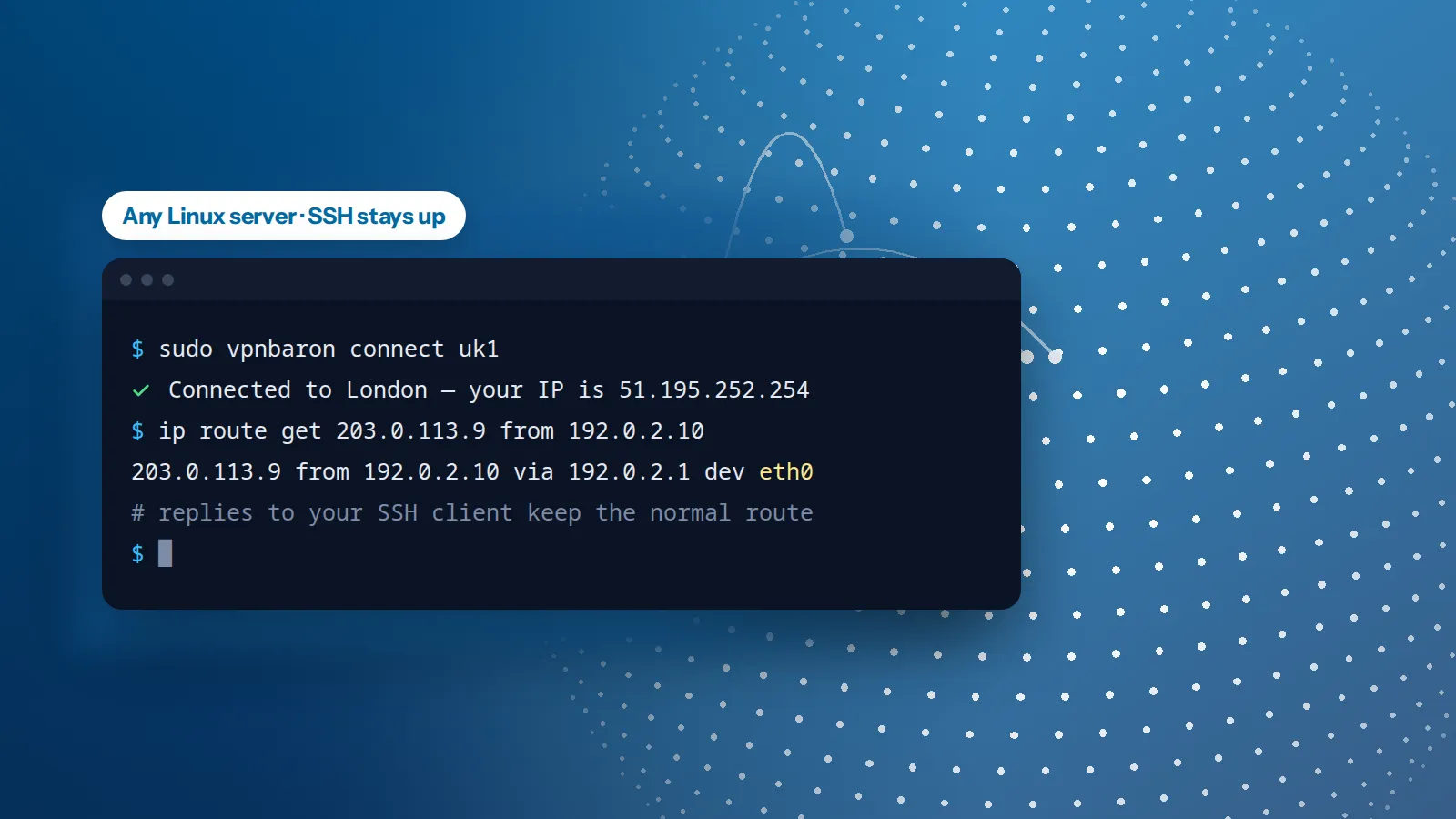
You SSH into a server, start the VPN, and the terminal stops responding. The server is fine and the VPN is up. Your session just lost its way back to you. It happens on any Linux server (Ubuntu, Debian, any cloud, x86 or ARM) with any VPN that routes all traffic. Below: why it happens, how to check before you connect, and how to keep the session up with OpenVPN, WireGuard or a stealth VPN.
Why the VPN cuts your SSH session
- Your SSH client connects to the server’s address, and every reply the server sends back leaves from that address.
- A full-tunnel VPN replaces the server’s default route: everything that isn’t for the local network now goes into the tunnel.
- So the replies to your SSH session go into the tunnel too. They come out at the VPN server, far from the route your client expects, and never reach you. The terminal stops responding, and after a while your SSH client gives up with “Broken pipe” or “Connection timed out”.
It isn’t only SSH. A website, database or API that people reach on the server’s address stops answering for the same reason.
The fix in one line: anything the server sends from its own address keeps the normal route, and everything the server starts itself goes through the VPN.
Check which way a reply will go
Linux will tell you which route a packet takes before you send it. These commands find your network interface, gateway and the server’s address, then ask how a reply to your SSH client would leave:
CLIENT=${SSH_CLIENT%% *}
IFACE=$(ip route show default | awk '{print $5; exit}')
GW=$(ip route show default | awk '{print $3; exit}')
ADDR=$(ip -4 addr show dev "$IFACE" | awk '/inet /{sub("/.*", "", $2); print $2; exit}')
ip route get "$CLIENT" from "$ADDR"
Run the last line again once the VPN is up. If it names your normal interface (eth0, ens3, enp0s1…), your session is safe. If it names the tunnel (tun0, wg0), the session will freeze.
First, a safety net
Before you connect on a remote server, schedule the disconnect. If the session dies, the server undoes the VPN by itself a few minutes later and you can log back in:
# VPNBaron CLI
sudo systemd-run --unit=vpn-undo --on-active=5min "$(command -v vpnbaron)" disconnect
# OpenVPN
sudo systemd-run --unit=vpn-undo --on-active=5min "$(command -v pkill)" openvpn
# WireGuard
sudo systemd-run --unit=vpn-undo --on-active=5min "$(command -v wg-quick)" down wg0
Once you’ve connected and the session still answers, cancel it:
sudo systemctl stop vpn-undo.timertmux or screen won’t keep the connection alive (the network is what breaks), but they do keep your commands running, so you can pick up where you left off after you’re back in. And keep your provider’s web console at hand the first time.
The easy way: a stealth VPN that leaves replies alone
VPNBaron CLI connects over Hysteria2 or VLESS Reality by default, and neither touches the replies. Their tunnel takes the traffic the server starts, but anything sent from the server’s own address keeps the normal route. Your SSH session stays up with no extra rules, and so does anything else people reach on the server.
curl -fsSL https://vpnbaron.com/download/linux/install.sh | sh
vpnbaron login
sudo vpnbaron connect uk1
Over SSH, connect with sudo: there’s no desktop session to approve the connection, and it still uses your own sign-in. Here’s the same kind of check on our test server, connected:
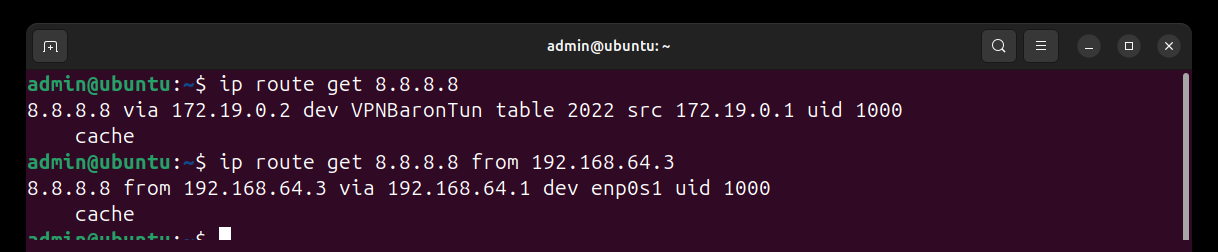
If you connect VPNBaron CLI over OpenVPN instead (-p udp or -p tcp), add the two rules in the next section first.
With OpenVPN: two routing rules
OpenVPN’s usual full-tunnel setup (redirect-gateway) sends everything through the VPN, replies included. Add two rules before you connect, from the same SSH session, using the values from the check above:
sudo ip route add default via "$GW" dev "$IFACE" table 128
sudo ip rule add from "$ADDR" table 128 priority 100
The first line keeps a copy of your normal route in a separate table; the second sends anything from the server’s address through that table. Everything else still goes through the VPN. On our test server, with OpenVPN connected:
$ ip route get 8.8.8.8 from 192.168.64.4      # before the rules: into the tunnel
8.8.8.8 from 192.168.64.4 via 192.168.202.1 dev tun0
$ ip route get 8.8.8.8 from 192.168.64.4      # after: the normal way
8.8.8.8 from 192.168.64.4 via 192.168.64.1 dev enp0s1 table 128
The rules last until the next reboot. To remove them sooner:
sudo ip rule del from "$ADDR" table 128 priority 100
sudo ip route flush table 128
With WireGuard: the same rules in the config
A WireGuard config with AllowedIPs = 0.0.0.0/0 routes everything through the tunnel too, so the same two rules apply. wg-quick adds its own routing rules when the tunnel comes up; ours, at priority 100, are checked before them. Put them in the [Interface] section so they’re in place before the tunnel takes the default route, and go away with it:
[Interface]
# … your existing keys and addresses …
PreUp = ip route add default via 192.0.2.1 dev eth0 table 128; ip rule add from 192.0.2.10 table 128 priority 100
PostDown = ip rule del from 192.0.2.10 table 128 priority 100; ip route flush table 128
Replace 192.0.2.1, eth0 and 192.0.2.10 with the gateway, interface and address that the check above printed, then bring the tunnel up with sudo wg-quick up wg0.
Common questions
Is this an Ubuntu problem, or an ARM one? Neither. It’s how routing works on any Linux system, with any full-tunnel VPN, on any provider or processor.
Will my website or API on the server keep working? With Hysteria2 or VLESS Reality, or with the two rules in place, yes: replies to its visitors leave from the server’s address, so they keep the normal route.
I’ve already lost the session. Now what?
Wait for the safety net if you set one, or open your provider’s web console and disconnect from there (sudo vpnbaron disconnect, sudo pkill openvpn or sudo wg-quick down wg0). Rebooting from the provider’s panel works too: VPNBaron CLI doesn’t reconnect by itself after a reboot, and the rules above don’t survive one.
Can I check before I risk it? Yes: run the route check from this page with the VPN up and the safety net set. If it names your normal interface, you’re fine.
VPNBaron
A VPN for your servers that leaves SSH alone
VPNBaron CLI connects over Hysteria2 and VLESS Reality on any Linux server, and the same plan covers the apps for Windows, Mac, iPhone and Android.
More in Linux & servers·Related: VPNBaron for Linux